
Hi.
I’m Doulber!
USER’S GUIDE for Doulber,
Escape from the 80s
1. INSTALLATION
(ONE of five choices)
A. PC
CD-ROM version
Place the CD-Rom into the CD-Rom drive
of your PC. The installation will
begin automatically, and once finished, you’ll see an icon on your
desktop that looks like this:

Doulber
Double
click on the Doulber icon and you’re ready to play the game! (See Step 2)
B. PC
DOWNLOAD version
Once Doulber has finished downloading,
a Doulber icon like this:
Doulber
will
appear on your desktop, and all you need to do is double click on the Doulber
icon and you’re ready to play the game! (See Step 2)
C. MAC
CD-Rom version
Put the CD-Rom into the CD-Rom drive of
your MAC. A CD-Rom icon will appear on your screen like this:

Doulber
Double click on the CD-Rom icon and
you’ll see two icons like this:
 or
or 
Doulber os
X
Doulber os 8&9
Double click on the
icon that corresponds to your Mac’s operating system. If you’re not sure which
operating system you use, go to your desktop’s far left on the top and
click and drag on the Apple icon and release your mouse on “About This
Mac.” This should indicate which OS version your Mac is using.
After you double
click on the appropriate icon, you’re ready to play the game! (See Step
2) Please note: you do not need to
install the CD-Rom version of Doulber. In other words, you are playing directly
from the CD-Rom.
D. MAC
DOWNLOAD version (OS X)
Once Doulber has finished downloading,
a Doulber file named DoulberosX.dmg.gz or Doulberdemo.dmg.gz (for the
downloaded demo version) will appear on your desktop, the icon will look like
this:
 or
or 
DoulberosX.dmg.gz
Doulberdemo.sit
Double click on this icon to uncompress
the file, and it will place a folder called, DoulberDemo (for the downloaded
demo version) on your desktop which will look like this:

DoulberDemo
Double
click on the folder and you’ll see an icon that looks like this:
 or
or 
DoulberDemoOSX
DoulberDemoOS8&9
Double
click on the icon representing your operating system and you’re ready to
play the game! (See Step 2)
E.
MAC DOWNLOAD version
(OS 8 & 9)
Before
you can play Doulber, your computer needs to decompress some of the music
files. You will see a dark screen with a message, and Doulber will be patiently
waiting (and meditating) at the lower left portion of your screen. This process
could take several minutes, but it will only need to perform this decompression
once. Please note: we do apologize for this if it is inconvenient for you,
however, we felt that this step was necessary in order to save a significant
amount of time while you downloaded Doulber originally. Without this step, you’d probably
still be downloading Doulber!
2. GETTING STARTED
Highlight the
desired function by using the cursor keys (arrows)), then pressing the
enter/return key.
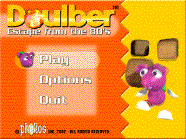
For example: highlight
“Play” then press the enter/return key to begin playing. Highlight
“Options” then press the enter/return key to choose your desired
music and sound effects levels, graphics detail* and key controls options (here
you can choose to change key functions).
*Please note that if you are
experiencing sluggish performance while playing Doulber, please select
“low” detail in the “Options” section. When selecting “low”
detail, however, you will lose some graphic details in exchange for faster
performance speed.
3. THE WHO WHAT WHY
WHERE AND HOW OF DOULBER:
WHO / WHAT / WHY
Doulber, [DOOL-bur],
is a mischievous ant, ferociously famished and in search of the food he digs
most: diamonds.
WHERE
His greediness for diamonds forces him to dig his
way through amazing mazes, to worlds filled with frolic and fun mixed with
blizzards, earthquakes, and avalanches. On his journey, he’ll encounter
volcanic lava, fires, floods or… other creatures trying to disturb little
Doulber’s fun adventures. That’s right. Doulber is not alone, so
beware -- especially for his evil doppelgänger,
“Darker.” SO.
Get ready to rumble….and tumble!
Your Mission:
Help Doulber dig his way to
fine dining, outwit his rivals and find his way home.
HOW
By using your
cursors (or keys of your option), move Doulber so he can find some diamonds.
Doulber can also push boulders and blocks out of the way. Warning: be careful
because boulders and even diamonds can easily fall on little Doulber!
For each level,
Doulber is required to consume a certain number of diamonds (which is indicated
to you on the display on the screen before you can begin playing the
level). Once he eats enough
diamonds he then needs to look for the exit to jump to the next level. The exit
door will remain closed until he eats enough diamonds. And remember, he has a
limited amount of time to do this. You’ll distinctly hear choir voices
that indicate he’s eaten enough diamonds and can proceed to the exit.
THE BONUSES

Pill
The pill will
give you a strength shield, the ability to get hit by a rock or a diamond once
without any penalties.

Compass
The compass
indicates the direction of the exit door.

Small Doulber
head
This gives
you an extra life.

Bomb
Pick up the
bomb by going thru it, then to drop and explode it, press the ctrl key or the A
button. This could be useful to
break through some walls...
THE CONTROLS
Cursor/Arrows or Joypad (PC
Only): Move Doulber
Space bar: Buddha
mode... Pressing the Buddha mode puts Doulber into a meditative trance and if
you move your cursors where there are diamonds next to him while pressing the space
bar, he can “absorb” them in his Buddha state, magically!
B Button or
CTRL key: Drop a bomb
F5: Pause
F1: Self-Destruct
(in case you get stuck)
ESC: QUIT
Note:
you can change the keys for different functions in the options / controls
section.
LEAVING THE
GAME
When you need to stop a game, press the
esc button and exit. If you would like to continue later at the level where
you’ve left off, simply type the password (located underneath the level
number) then press the enter/return key.
For example: The password for Level 005 is MED. When you begin a new
game and want to start at level 005, once level 001 begins just type MED and
press the enter/return key. It will then take you to level 005. Note: You must type your password during a level and
press the enter/return key, and then you'll be sent to the desired level.
4. SOME
TECHNICAL NOTES
For better performance you can copy the
whole game to the hard drive, it does not require any special installation and
does not install any dlls.
Compatibility issues:
Mac OS X:
450 Mhz or more processor is
recommended.
If the game cannot set your screen to
640*480, the game will be placed into the top left corner and remove all menu
bars...
If played in windowed mode, the screen
depth will be changed to 16 bits, it will result in a flash on exiting the game
(while we are restoring the depth to its original state).
Quitting all opened applications will
result in better gaming performance.
PC Windows:
Your video card must be DirectDraw
Compatible and have at least 2 Megs of VRam, (the savage 3D processor is only
for 3D so the game will not run on it, you will need to run a Savage 3D IX with
directDraw blitter).
DirectX5 or more is required.