 |
 |
|
 |
|
|
|
Embedded clipping paths can cause problems, particularly if they've been used in other programs. The clipping path can become misregistered, clipping the wrong part of the image. Fortunately there's an easy solution... |
||
|
|
|
 |
||
|
|
|
|
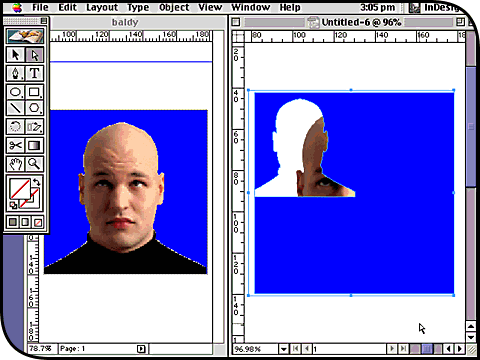
Take a look what can happen to embedded clipping paths when opening an XPress page (shown in the left window) in InDesign (on the right). Although the path has been created in Photoshop rather than XPress, its association with XPress on the page has somehow caused the clip and the image to come apart. |
||
|
|
|
 |
||
|
|
|
|
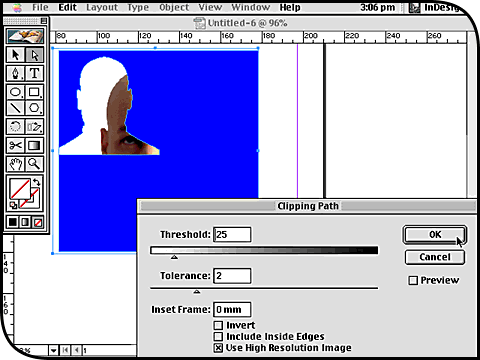
Luckily, it’s very easily fixed afterwards in InDesign. Click on the image with the Direct Selection tool and then choose Clipping Path from the Object menu. This opens up the Clipping Path dialog as shown. The values that appear in the dialog are those embedded in the original image. Don’t change them, just click OK. |
||
|
|
|
 |
||
|
|
|
|
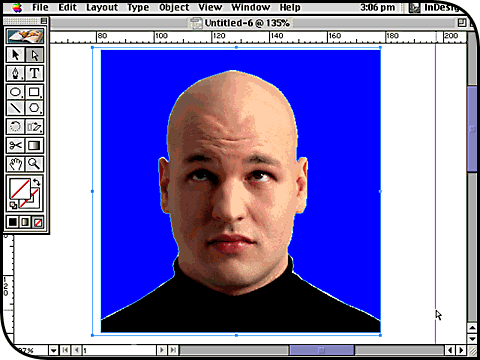
This is the result: the image and its embedded clipping path come back together according to their original settings and at the correct size. You can actually check out this result before clicking OK to close the Clipping Path dialog by activating its Preview option. That way you can experiment with custom clip settings from within InDesign. |
||
|
|
|